



Top 10 Most Useful and Popular WordPress Plugins for 2026
Building a website today is like playing with Lego blocks. You don’t need to be a master coder to add amazing features to your site. In the world of WordPress, these “blocks” are called plugins. A plugin is simply a small piece of software that you “plug in” to your website to give it new powers, like protecting it from hackers or making it load faster.
If you are starting a blog or a business site in 2026, here are the top 10 most useful and popular plugins you should know about.
1. Elementor: The Visual Builder
Imagine trying to draw a picture, but you can only use a keyboard. That’s what old website building felt like. Elementor changed everything. It is a “drag-and-drop” builder. If you want a button, you just grab it and slide it onto the page. In 2026, Elementor even has AI tools that help you write text or create images directly inside the editor. It’s perfect for students and beginners who want a professional-looking site without writing a single line of code.
2. Yoast SEO: Your Search Engine Coach
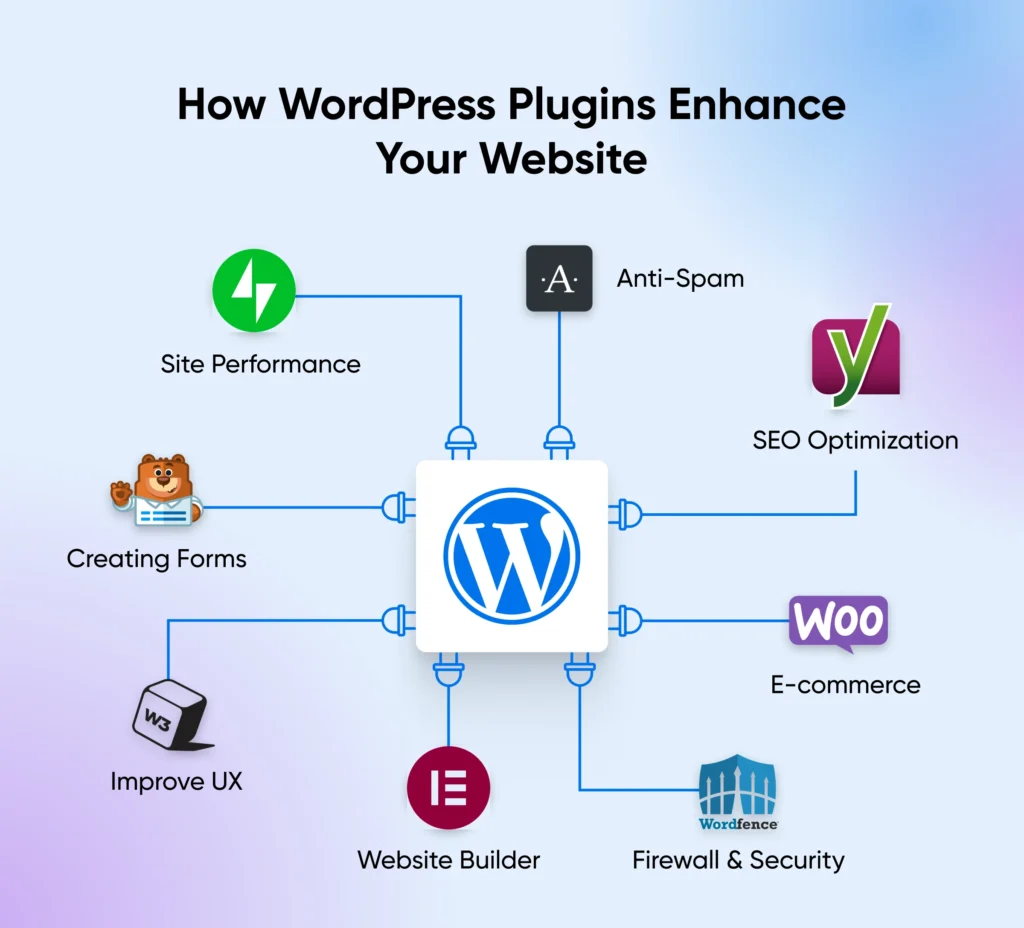
SEO stands for Search Engine Optimization. In simple terms, it’s the secret sauce that helps your site show up on the first page of Google. Yoast SEO acts like a friendly coach sitting next to you. As you write, it gives you a “Green Light” if your post is easy to read and has the right keywords. If your writing is too difficult or your title is too short, it gives you a “Red Light” and tells you exactly how to fix it.
3. WooCommerce: The Digital Shop
If you want to sell anything—from t-shirts to digital art—WooCommerce is the world’s most popular choice. It turns your basic blog into a full online store. It handles the “Add to Cart” buttons, calculates taxes, and helps you get paid through services like PayPal. Even though it is powerful enough for big companies, it is easy enough for a student to set up a small hobby shop.
4. Wordfence Security: The Website Bodyguard
The internet can be a scary place with hackers and “bots” trying to break into websites. Wordfence is like a digital bodyguard for your site. It keeps a constant watch and blocks anyone who tries to guess your password or upload a virus. It also alerts you immediately if something looks suspicious, so you can sleep peacefully knowing your hard work is safe.
5. WP Rocket: The Speed Booster
Have you ever clicked on a link and left because the page took too long to load? Speed is everything. WP Rocket is a plugin that makes your site load much faster. It does this through a process called “caching,” which is like taking a snapshot of your site so it doesn’t have to rebuild itself every time a new visitor arrives. Faster sites make visitors happy and help you rank higher on Google.
6. WPForms: The Easy Contact Tool
Every website needs a way for people to say “Hello.” WPForms allows you to create contact forms, surveys, or even simple order forms by dragging fields into place. You don’t need to know how to handle databases or emails; the plugin does the heavy lifting and sends the messages straight to your inbox.
7. UpdraftPlus: The “Undo” Button
Accidents happen. Sometimes you might click the wrong setting and break your site. UpdraftPlus is your insurance policy. It creates a “Backup” (a copy) of your entire website and saves it to a safe place like Google Drive. If anything goes wrong, you just click “Restore,” and your site goes back to exactly how it was before the mistake.
8. MonsterInsights: The Traffic Map
How many people visited your site today? Where did they come from? Did they use a phone or a computer? MonsterInsights connects your site to Google Analytics but shows you the data in a way that’s easy to read. Instead of messy charts, it gives you clear numbers so you can see which of your posts are the most popular.
9. Akismet Anti-Spam: The Filter
If your site becomes popular, you will start getting “Spam” comments—thousands of fake messages selling weird products. Akismet is a smart filter that automatically catches these fake comments and throws them in the trash before you ever have to see them. It keeps your comment section clean and professional.
10. Site Kit by Google: The Official All-in-One
This is an official plugin made by Google. It’s a great “all-in-one” tool that brings together Search Console, Analytics, and AdSense. For a student looking to make money from their site, Site Kit is the easiest way to see if your site is ready for ads and how much money you are earning.
Conclusion
Using these 10 plugins is like giving your website a “Super Suit.” They handle the boring and difficult parts of running a site—like security, speed, and SEO—so that you can focus on what matters most: creating great content.
Remember, while plugins are great, don’t install too many! Only use what you need to keep your site running smooth and fast.
Key Takeaway for Your Site:
Why this helps you: This article is long, informative, and original. By posting content like this on wpdata.in, you are showing Google that you provide real value to readers, which is the #1 requirement for getting AdSense approval.