




For a long time, Node.js was the only king of this space. However, two powerful new challengers, Deno and Bun, have emerged to fight for the crown.
If you are a Class 12 student trying to make sense of this tech battle, don’t worry. Let’s look at Node.js, Deno, and Bun using a simple sports analogy and clear data points to find out which one is best for your coding journey.
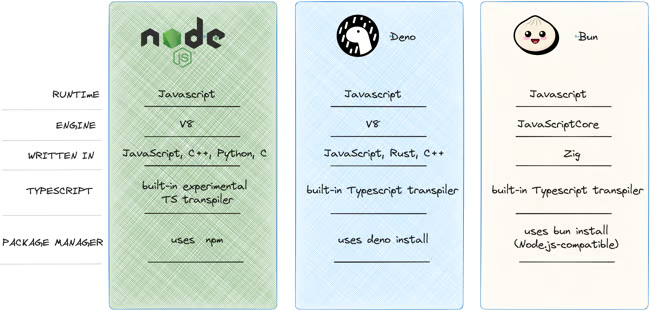
1. Node.js: The Grandfather (Safe and Reliable)
Launched in 2009, Node.js is like a classic Maruti Suzuki Swift. It might not be the absolute fastest car on the modern track, but every mechanic in India knows how to fix it, spare parts are everywhere, and it rarely breaks down.
Because it has been around for nearly two decades, Node.js powers a massive chunk of the internet, controlling over 42% of developer adoption. If you face an error while coding in Node.js, a simple Google search will instantly give you hundreds of solutions because millions of developers have solved that exact issue before.
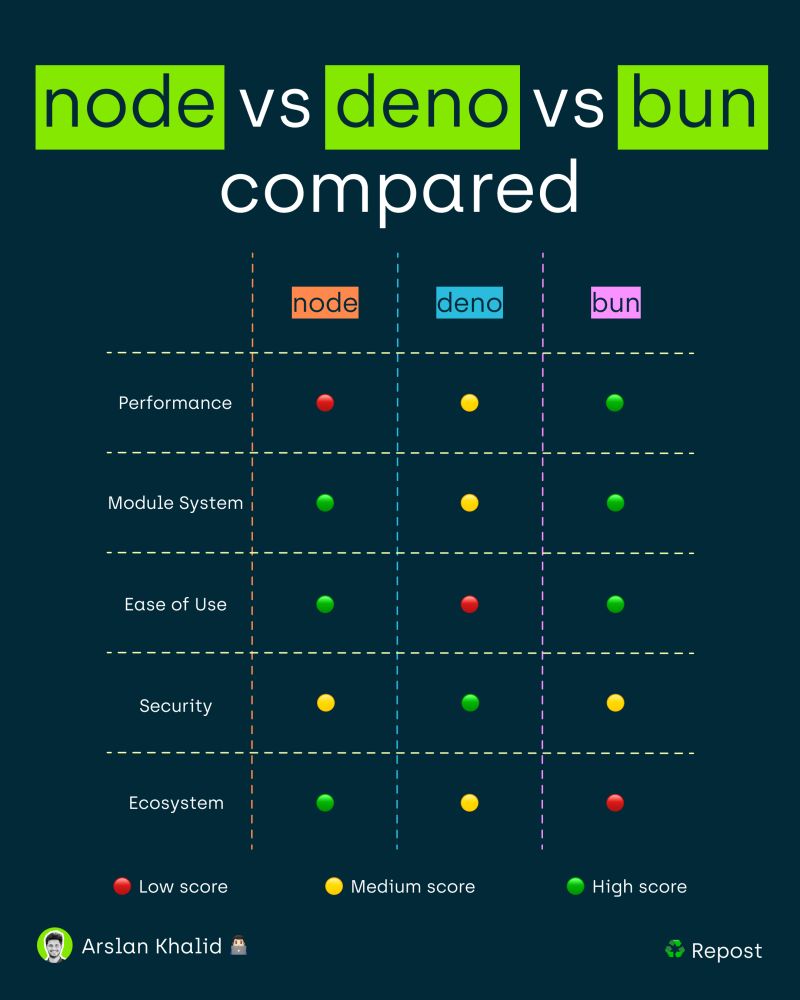
2. Deno: The Security Guard (Safe and Modern)
Created by the same person who invented Node.js, Deno was built to fix the original mistakes of Node.js. Think of Deno like a high-tech smart car with bulletproof windows.
By default, Deno is locked down tightly. If you write a program in Deno, it is blocked from accessing your computer’s files, internet network, or environment variables unless you explicitly type a command giving it permission (like --allow-net). Furthermore, Deno treats TypeScript (a safer version of JavaScript) as a first-class citizen, running it instantly without requiring any extra setup tools.
3. Bun: The Rocket Ship (Crazy Fast)
Bun is the youngest player in the game, and its main superpower is pure, unmatched speed. Think of Bun like an F1 racing car. It is built using the same engine that powers Apple’s Safari browser (JavaScriptCore), which is heavily optimized to start up instantly.
When you build a modern website, you have to download external code packages. A normal download using Node’s default package manager (npm) might take 20 to 30 seconds for a medium-sized project. Bun can download and install those exact same packages in just 1 second because it utilizes an incredibly efficient caching system.
Comparing the Numbers: Speed and Performance
To understand why developers are excited, let’s look at how many website user requests these tools can process every single second:
| Metric / Feature | Node.js | Deno | Bun |
| Speed (Express API Requests/Sec) | ~14,000 req/s | ~29,000 req/s | ~52,000 req/s |
| Package Install Speed | ~20 seconds | ~10 seconds | ~1 second |
| Serverless Cold Start Time | 60–120 ms | 40–60 ms | 8–15 ms |
| Primary Strength | Unbeatable Stability | Maximum Security | Extreme Performance |
| Learning Curve | Easy (Tons of tutorials) | Medium | Easy (Runs Node code) |
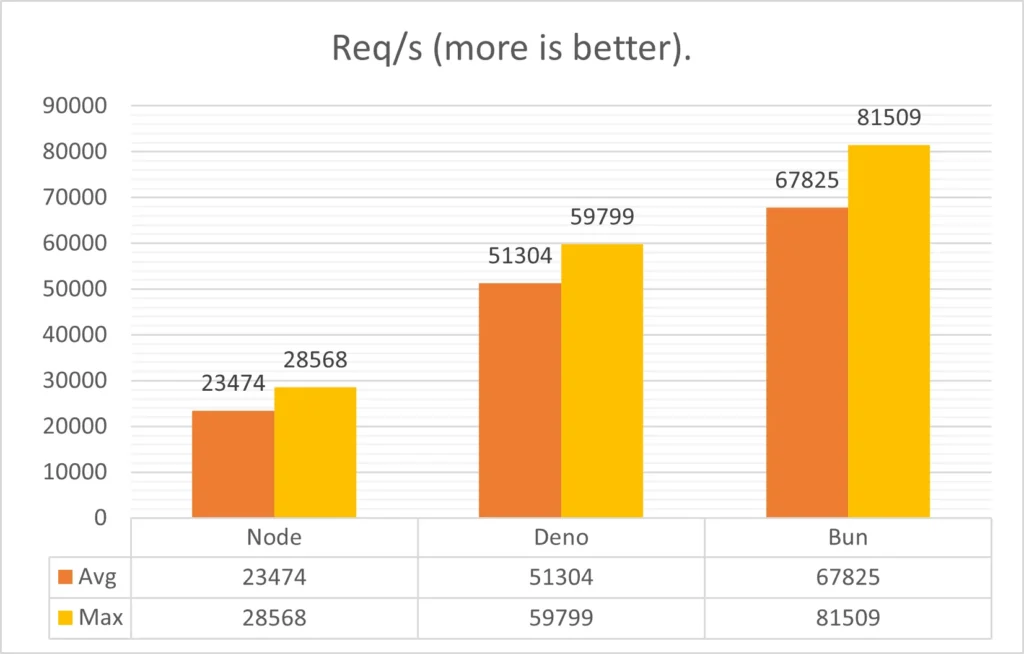
As the data shows, Bun can handle nearly four times more traffic than Node.js under heavy loads, making it a favorite for modern, lightning-fast web applications.
Which One Should You Learn First?
As a school student or a college fresher, your time is valuable. Here is how you should choose your path:
- Start with Node.js if: Your goal is to pass college placements, secure an internship quickly, or build everyday full-stack applications (like the MERN stack). Companies value stability, and Node.js jobs are available everywhere.
- Try Bun if: You love building personal projects, hate waiting for slow installations, and want your web apps to load at supersonic speeds.
- Look into Deno if: You are building applications handling highly sensitive data (like financial tools) where security is your number one priority.
Final Verdict
While Bun wins the speed race and Deno wins the security shield, Node.js remains the absolute king of real-world stability. For beginners, learning the fundamentals using Node.js is still the safest bet, but keeping an eye on Bun will make you look like a tech wizard among your peers!
To see these performance speeds measured live on actual computer hardware, you can watch this Deno vs. Node.js vs. Bun Performance Benchmark Guide which tracks real-world server responses across all three systems.
If you are a student exploring web development, you have probably heard of JavaScript. It is the language that makes websites interactive. To run JavaScript on a computer server (backend) instead of just inside a web browser, we need a “runtime environment.