



When choosing a cloud provider, the decision is rarely just about technical features—it is about the bottom line. As a business owner, developer, or student, understanding the pricing structures of the “Big Three”—Amazon Web Services (AWS), Google Cloud Platform (GCP), and Microsoft Azure—is vital for keeping your projects sustainable.
In 2026, the cloud market has matured, and while all three providers offer similar core services, their pricing models remain notoriously complex. Here is a breakdown of how they compare and how to make the right financial choice.
The Three Pricing Philosophies
To compare them, you must understand how they approach the market:
- AWS: The “Gold Standard” of variety. AWS offers the most services, which means you can find a pricing tier for almost anything. However, the sheer number of options can lead to “bill shock” if you don’t monitor your usage.
- Google Cloud: The “Efficiency” expert. GCP is often praised for its simplicity in billing and its focus on big data and AI. They offer “Sustained Use Discounts,” which automatically lower your price the longer you run your machines.
- Azure: The “Enterprise” favorite. Azure’s pricing is heavily tied to the Microsoft ecosystem. If your company already uses Windows Server, SQL Server, or Microsoft 365, you can get massive discounts that make it significantly cheaper than the others.
Key Pricing Comparison Factors
1. Computing Power (Virtual Machines)
All three charge by the second or hour for virtual machines.
- AWS (EC2): Offers “Spot Instances,” which allow you to buy unused capacity for up to 90% off. It is the cheapest if you can handle your application potentially shutting down when the demand rises.
- Google Cloud (Compute Engine): Offers “Custom Machine Types.” Unlike AWS or Azure, where you must pick a set size (e.g., 2GB RAM or 4GB RAM), GCP lets you build a machine with the exact amount of CPU and RAM you need. This prevents you from paying for unused resources.
- Azure (Virtual Machines): If you are running Windows workloads, Azure is almost always the cheapest because of “Azure Hybrid Benefit,” which lets you use your existing on-premise Windows licenses in the cloud.
2. Storage Costs
Storage pricing is generally competitive across the board, but the “fine print” matters.
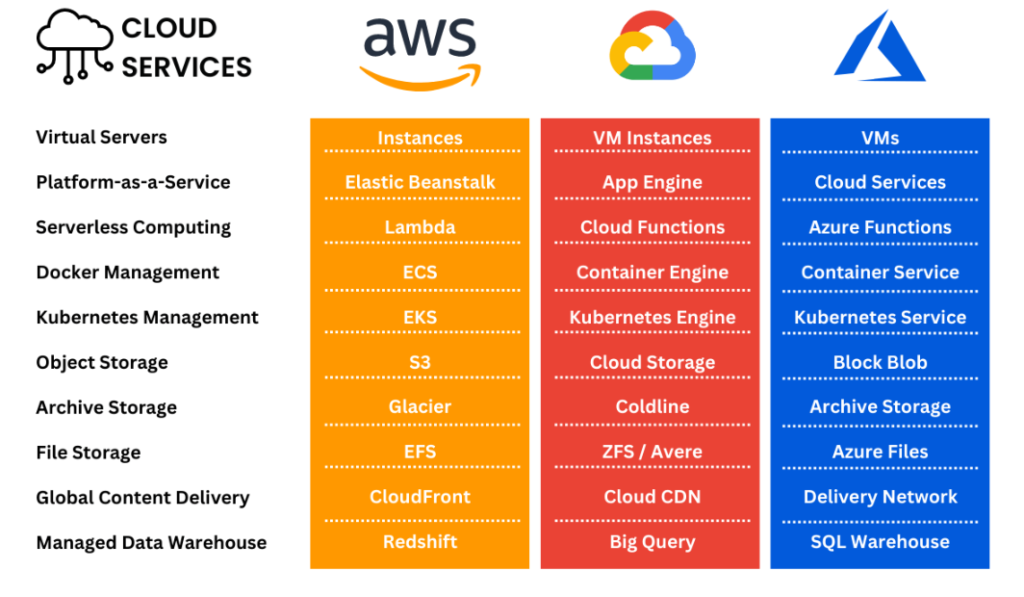
- AWS (S3): Has multiple tiers (Standard, Intelligent-Tiering, Glacier). The “Intelligent-Tiering” is a standout feature that automatically moves your data to cheaper storage if you haven’t accessed it in a while, saving you money without you needing to do anything.
- GCP (Cloud Storage): Highly competitive for cold storage (data you don’t access often). Their “Archive” class is often the most cost-effective for long-term backups.
- Azure (Blob Storage): Very similar to AWS, but integrates seamlessly with Microsoft’s enterprise security tools, which can save you the cost of buying third-party security software.
3. Data Transfer (Egress)
This is the “hidden” cost of the cloud. You pay to bring data into the cloud, but you also pay to move it out of the cloud (to the internet).
- GCP is generally considered the most transparent here, with strong partnerships that keep data transfer costs lower for big data projects.
- AWS and Azure have complex egress pricing that changes based on the region and the volume of data. If you have a high-traffic website that serves a lot of video or large files, you must use a Content Delivery Network (CDN) like CloudFront (AWS) or Azure CDN to bring these costs down.
Which Provider is Best for Your Budget?
| Scenario | Recommended Provider | Why? |
| Startup / Student | Google Cloud | Sustained use discounts and $300 free trial credits make it great for learning. |
| Enterprise / Corporate | Azure | Massive discounts if you already use Windows/Office products. |
| Massive Scalability | AWS | Best-in-class tools for scaling and a massive selection of instance types. |
How to Keep Your Cloud Costs Low (The “Fast” Way)
Regardless of the provider you choose, you can keep your cloud bills fast and lean by following these three rules:
- Rightsizing: Don’t just pick the biggest server. Use monitoring tools to see how much RAM you actually use. If you are only using 10% of your server, downsize it.
- Reserved Instances: If you know you will need a server for the next 1–3 years, pay upfront. You can save 30% to 60% compared to “pay-as-you-go” pricing.
- Use a CDN: If you host images or videos, serve them through a CDN. It caches your content in data centers near your users, which improves speed and significantly reduces your data transfer costs from the main server.
Final Verdict: Don’t Overthink It
In 2026, the pricing difference between AWS, GCP, and Azure is smaller than ever. The “best” price often comes down to how you manage your resources.
If you are a solo developer building a web app, don’t worry about the enterprise-level price differences. Focus on the platform you feel most comfortable with, utilize the free tier (all three offer one!), and set up Budget Alerts. Budget Alerts are the most important feature you can set—they will email you the moment your spending hits a certain amount, preventing the dreaded “surprise bill” at the end of the month.
Whether you choose AWS, Google Cloud, or Azure, the key to a fast, cost-effective website is not the platform itself, but the disciplined management of your storage and computing instances. Start small, track your usage, and scale up only when your traffic demands it.